If you need more time to travel, you can add extra days to your Greyhound Whimit Travel Pass online.
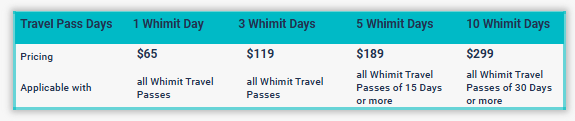
Depending on your original pass, you may be able to add 1, 3, 5, or 10 additional Whimit Days.
To add more days to your Whimit Travel Pass:
- Log in to Manage Booking using your booking number and email address.
- Select your Whimit Travel Pass.
- Choose the option to extend your pass.
- Select the number of additional days you wish to add and complete payment.
Once your pass is extended, you can continue booking and travelling within the updated validity period, subject to seat availability.
You can also watch our video guide on how to add more days to your Whimit Travel Pass.
Was this article helpful?
That’s Great!
Thank you for your feedback
Sorry! We couldn't be helpful
Thank you for your feedback
Feedback sent
We appreciate your effort and will try to fix the article