Choosing your seat can make the journey that little bit more comfortable. With Seat Selection, you can reserve a window or aisle seat when you book your Greyhound travel.
You don’t have to choose a seat during booking. If you leave it for later, we’ll allocate the first available seat on each service you’re travelling on.
Changing Your Seat
Plans and preferences can change. You can update your seat selection at any time before your coach departs through your My Greyhound account.
How to Change Your Seat
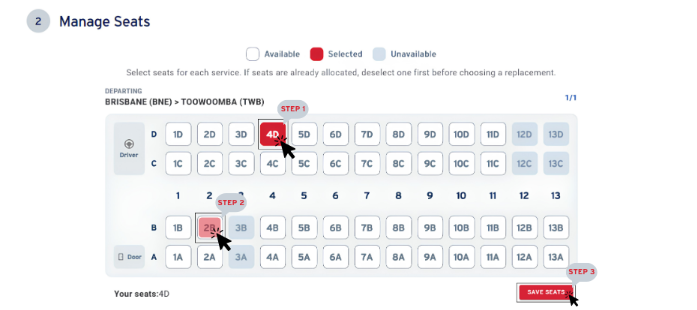
Step 1: Your allocated seat will be shown in red, while unavailable seats will be greyed out and not clickable. Deselect your allocated seat to begin making a change.
Step 2: Select the seat you’d prefer. You can update your selection as many times as you need.
Step 3: Once you’re happy with your seat, scroll down & select SAVE SEATS to save your changes and proceed to payment.
Important: seat allocations, whether chosen during booking or allocated automatically, are not guaranteed. Last minute bookings, coach changes or operational requirements may result in a different seat being allocated. Our coach captains also have the ability to change your seat prior to and during transport.
Was this article helpful?
That’s Great!
Thank you for your feedback
Sorry! We couldn't be helpful
Thank you for your feedback
Feedback sent
We appreciate your effort and will try to fix the article